
Direction & Content
Adding event interviews: From preparation to selecting clips in Frame.io
Who conducts the interviews, how do you select the best quotes, and when are they added to the film? Our workflow, including a step-by-step Frame.io guide.
8 min read
Interviews give an event film a personal voice: What mattered to attendees, what message should remain, and how does your company put the event into context? When you add interviews to your booking, the process includes preparation, editorial coordination and a clear selection of the statements you want to use—not just filming. Here is how we work together.
1. Before the event: Questions, objectives and additional technical setup
Interviews involve more than an extra camera shot. Clear sound requires suitable microphones and a controlled recording environment. Depending on the location, we also set up lighting, choose a suitable background and coordinate camera and interviewee positions. Time, equipment and an appropriate space need to be allowed for in the event schedule. A quiet area is usually more suitable than filming beside loudspeakers or in the busiest part of the venue. Where needed, we agree on the interview questions with you before the event. What matters is the type of statement the final film needs: a personal impression, expert insight or a key company message. Short, open questions help produce clear answers. We also establish who should be interviewed and when they will be available.
2. At the event: You conduct the conversations; we provide interview direction
Editorial support comes from your team: Someone from your company conducts the interviews and asks the agreed questions. They know the interviewees, the subject matter and your company’s messages. Please appoint a responsible person who will be available during the interviews. Of course, we support you throughout. We help with the conversation and provide interview direction: We take care of eyelines, framing, lighting and sound, help achieve clear answers and flag statements that would benefit from being repeated as a complete thought. When useful, we assist with follow-up questions or suggestions so an answer can work in the film without the question being heard.
3. The following day: All interviews together in Frame.io
On the day after the event, we send you all the interviews together through the online review tool Frame.io. The share link lets you watch the recordings and comment on your selections directly on the video. At this stage, you are choosing the statements you want to use; the finished event film is created afterwards. Please watch the interviews and mark the passages you would like included. Clearly linked selections reduce follow-up questions and help us reflect your content priorities in the edit.
4. Frame.io: Select a passage and leave a range comment
Open the relevant interview and expand the “Comments” panel on the right if it is collapsed. Commenting must be enabled on the share link. The interface may look slightly different depending on the Frame.io version, but the principle is the same: A comment is linked to a specific point or time range.
Step 1 – Find the passage: Play the interview and pause where the desired statement begins. Make sure the thought remains fully understandable and does not start or end halfway through a sentence.
Step 2 – Activate the comment input: Click the field for a new comment and start typing, for example “Selection 01 – use as the opening.” According to Frame.io’s instructions, the range selector appears once you start typing. Opening the Comments panel alone is not sufficient.
Step 3 – Set the start and end: Before sending the comment, drag the range selector’s handles on the timeline to the desired start and end points. The passage appears as a colored or highlighted range. The handles adjust its length; dragging the colored center moves the entire range.
Step 4 – Describe your selection clearly: Add a clear instruction that the selected passage should be used and where it should appear in the film. Give specific directions rather than general remarks such as “This is good.”
Step 5 – Send and check: Click “Send” or the send icon, or press Enter. The saved range comment shows both a start and an end timecode. Click the comment afterwards to recall the marked range in the player and check your selection.
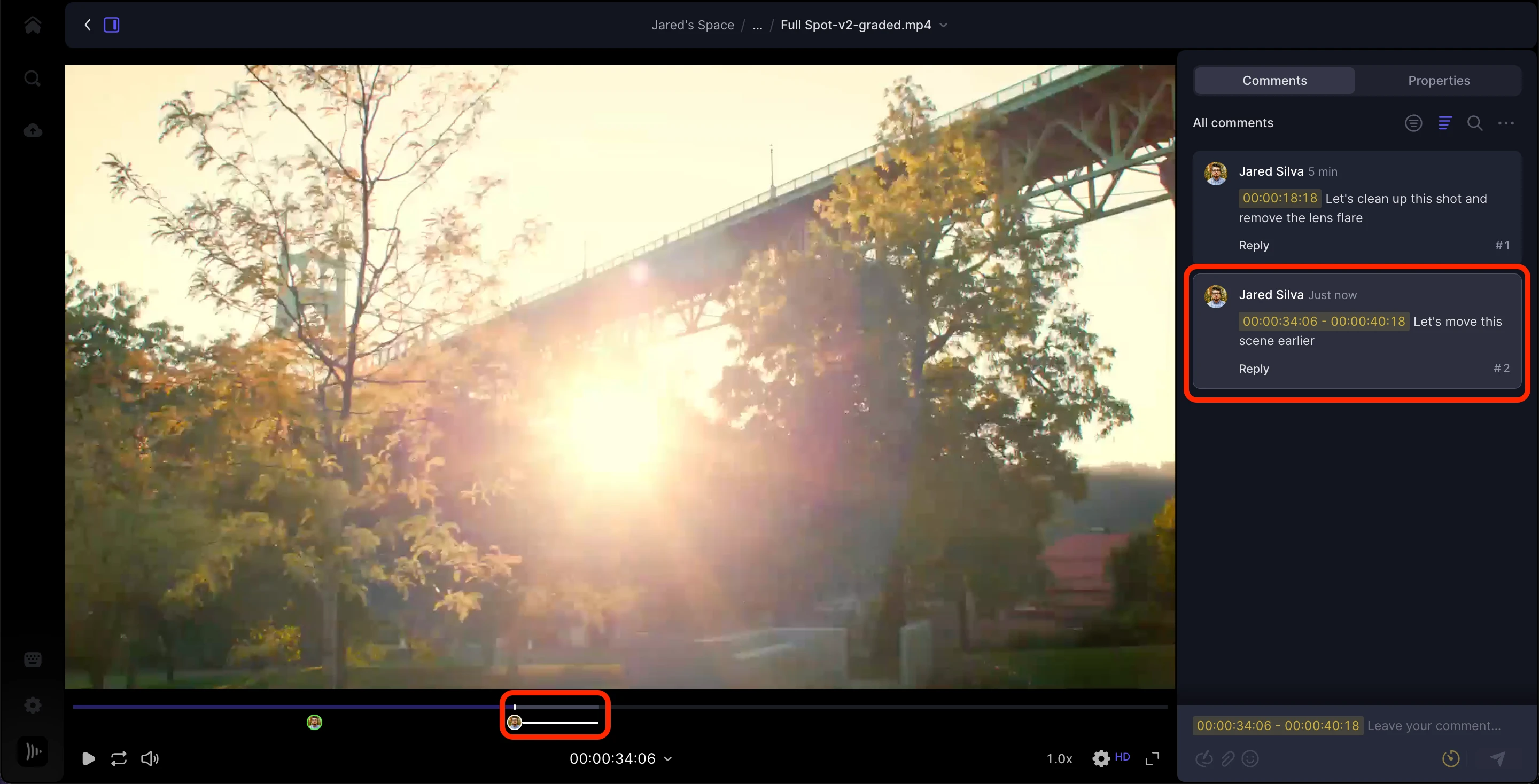
This screenshot comes from the official Frame.io help documentation and shows a range comment with start and end timecodes, together with the corresponding marked section in the timeline.
5. Specify the sequence—please do not rely on names alone
Number your selected statements across all interviews, for example “Selection 01,” “Selection 02” and “Selection 03.” This makes the intended sequence in the final film clear. The order of comments displayed in Frame.io is not automatically the editing order: Comments may be sorted by timecode or creation time, for example. Important: We usually do not know the interviewees by name. A note such as “Please start with Ms Müller’s sentence” is therefore not clear enough on its own. If necessary, add a brief description of the person for the lower-third titles, e.g.
6. Finished selecting? Please let us know by email
Once you have marked all the passages you want and specified their sequence in clear comments, please send us a short email. This lets us know the selection is complete and that no further comments or decisions are still pending. If several people in your company provide feedback, please coordinate it internally. A consolidated selection with clear decisions is more useful than conflicting comments on the same passage.
7. Next: Integrating the interviews and adding relevant B-roll
Using your selections, we integrate the interviews into the video. We focus on a clear narrative, smooth transitions and preserving the context of each statement during editing. We also try to add suitable B-roll recorded at the event: audience shots, conversations, presentations or event details, for example. Ideally, these images relate directly to what is being said. The footage available naturally depends on what was actually captured at the event. Not every statement can be illustrated literally; coherent, relevant imagery matters more than forcing a visual match. The result is not simply a series of separate interview blocks, but personal statements that fit naturally into the story of your event.
The process at a glance
- Before the event: Agree on objectives, interviewees, questions and technical requirements.
- At the event: Someone from your company conducts the interviews; we support them and provide interview direction.
- The following day: Watch all interviews together through Frame.io.
- In Frame.io: Start typing in the comment field, mark time ranges and give clear instructions for the desired sequence.
- After selecting: Confirm completion by email.
- During editing: The selected statements are integrated into the event film and
Further Frame.io help
This guide follows the official Frame.io articles “Commenting on your media” and “Share Links Explained for Clients,” available at https://help.frame.io/en/articles/9105251-commenting-on-your-media and https://help.frame.io/en/articles/9105242-share-links-explained-for-clients.
More articles
Costs & Budget
How much does an event video cost? An honest guide
Why a video of the same event can cost 1000 euros or 7,000 euros — and which five decisions really determine the price.
Livestream
Planning a Livestream: The Checklist for Congresses and Conferences
From the first briefing to the final review: what really needs to be settled before broadcast day – sound, connection, schedule and rights. With specific figures and the mistakes we see most often.